The vegetable garden planner that knows your frost dates
VegLog tells you what to sow, when to plant out and what's ready to pick, all timed to your own town. Draw your beds to scale, plan the whole year, and keep a record of every harvest.
Free for your first growing space. For iPhone and iPad.
114 crops
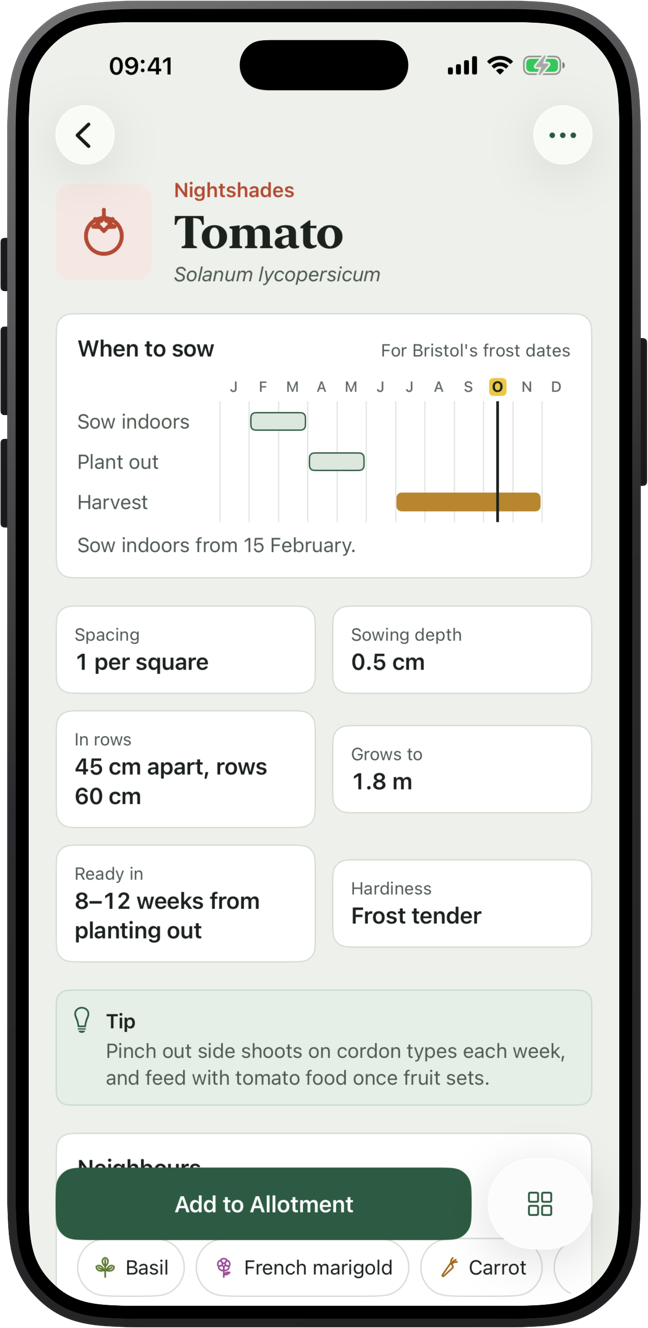
Vegetables, herbs, fruit and flowers, and you can add your own
Your frost dates
Worked out for your town from recent Apple Weather data
No account
No sign-up and no ads. Syncs through your own iCloud
Metric or imperial
Metres or feet, kilos or pounds, in English, German, French or Spanish
Your week in the garden
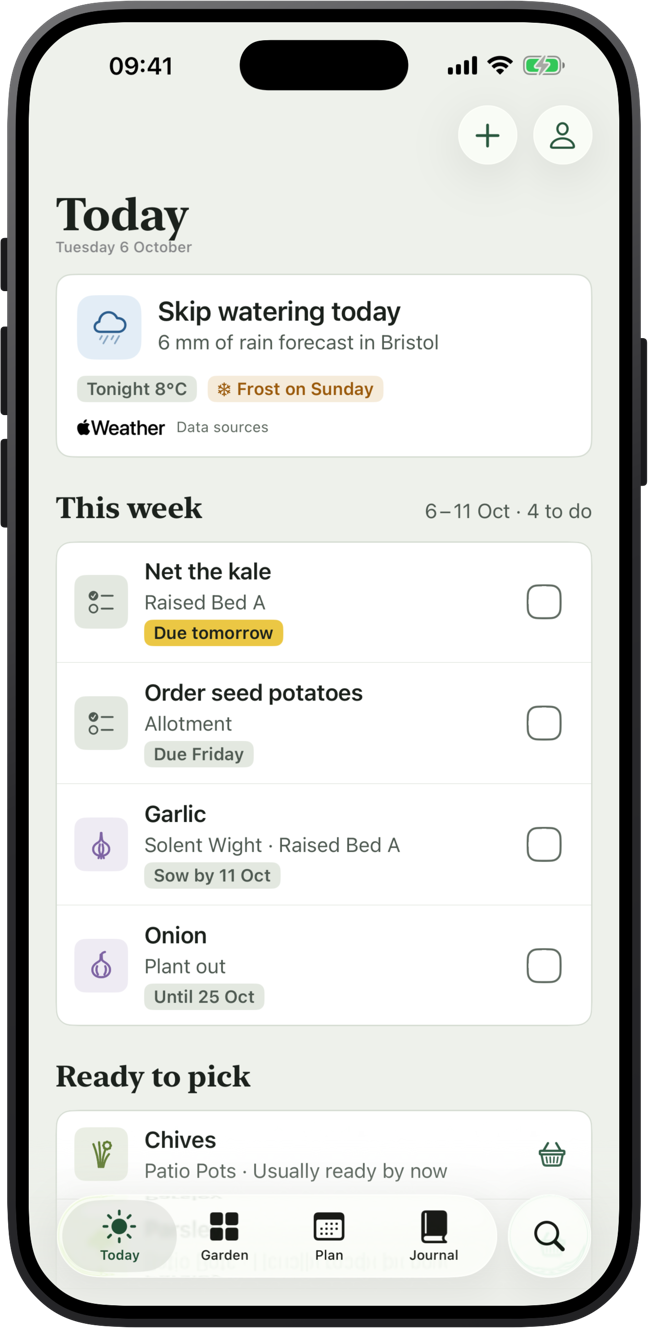
Open it and know what to do this week
Today brings together this week's sowings, jobs and crops that are ready to pick. It reads your local forecast too, so it will tell you to fleece tender crops before a frosty night, water early on a hot day, or leave the can alone when rain is on the way.
- A round-up of the week ahead every Saturday morning
- A frost alert the evening before a frost (Pro)
- Home Screen and Lock Screen widgets with this week's jobs
Plan your beds
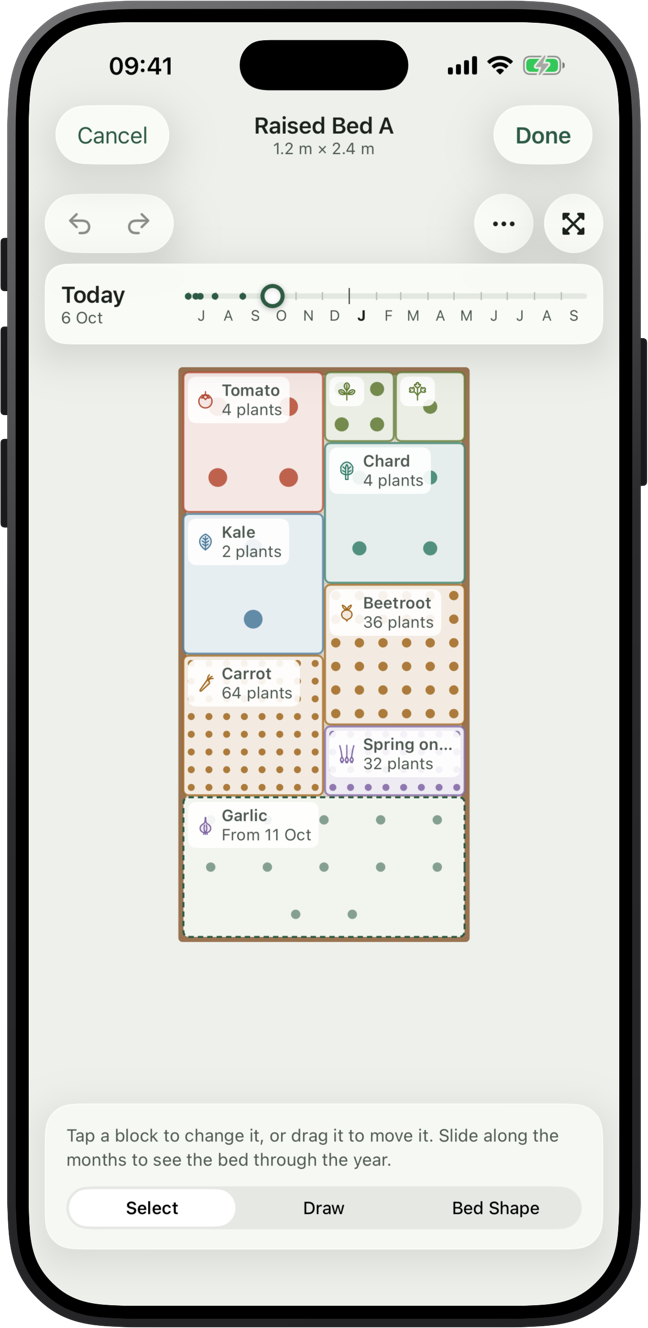
Draw every bed to scale, then fill it
Raised beds, borders, allotment plots, greenhouses, polytunnels and pots, in any shape you like. Lay crops out in squares, blocks or rows and VegLog works out the spacing and how many plants fit.
Slide through the months to see what's in the bed on any day, and what could go in when a crop comes out.
Advice as you plan
Warnings about neighbours, rotation and spacing
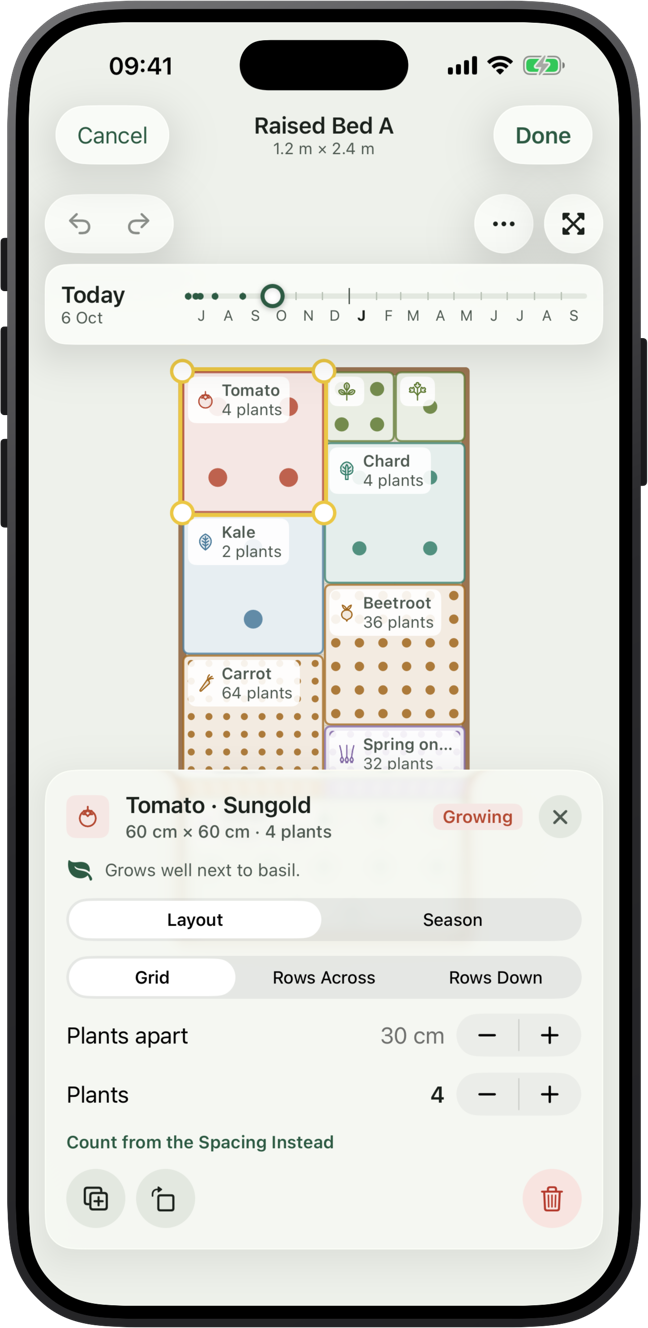
As you place crops, VegLog points out good and bad neighbours, crops going back where their family grew last year, tender plants going out before the last frost, and spacing that's too tight.
Short of ideas? Start from a template such as a salad bed or the three sisters, or let VegLog suggest a plan for the crops you want.
Sow at the right time
Sowing dates for your garden, not the whole country
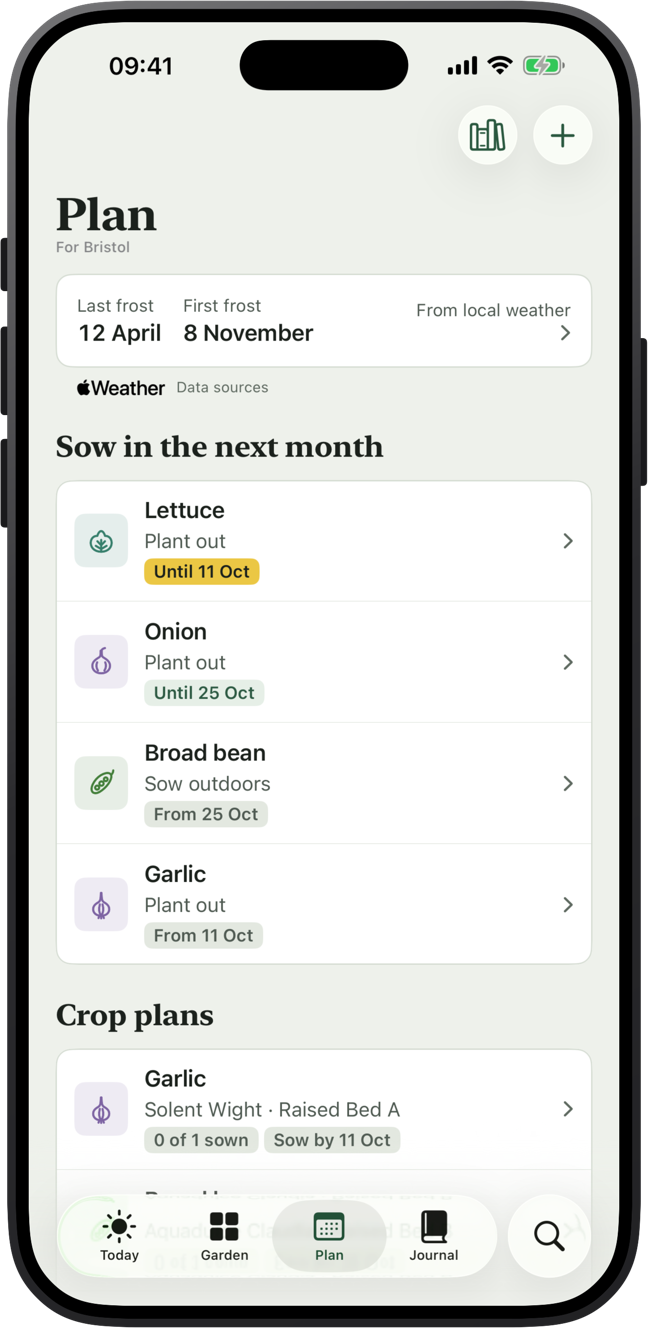
A seed packet gives one date for everywhere from Cornwall to Caithness. VegLog works out your average last and first frost from the last few years of weather in your town, then sets every crop's sowing, planting and harvest window around them.
- Sow now: everything you can sow this month, at a glance
- Crop plans with succession sowings and reminders (Pro)
Try it here
See how frost dates move a sowing calendar
This is the tomato chart from the app. Switch to your own frost dates and watch the windows shift. A garden with a late May frost has a very different spring from one on the south coast.
Browse all 114 cropsTomato
Solanum lycopersicum
Last frost around 20 April, first frost around 31 October.
- Sow indoors
- late February to late March
- Plant out
- early May to early June
- Harvest
- mid-July to late October
More features
Records, widgets, Siri and iCloud
A record of every season
Log plantings, harvests by weight, notes and photos, then look back through your year month by month.
Harvest totals
See what each crop and each bed gave you, so you know what earned its space. (Pro)
A crop library you can change
114 crops with depth, spacing, hardiness and neighbours. Edit any of them or add your own.
Siri and widgets
Ask Siri what's due in the garden or log a harvest by voice. Tick off jobs from the Home Screen.
iPhone and iPad
Plan on the big screen at the kitchen table, then take your phone to the plot. iCloud keeps them in step.
No account, no ads
No account, no ads, and VegLog never asks for your location. You just choose your town.
Free and Pro
What's free, and what Pro adds
VegLog
Free
- One growing space
- Unlimited plantings, harvests, notes and to-dos
- Sowing chart for every crop, set to your frost dates
- Today, forecast advice and widgets

VegLog Pro
Subscription or lifetime
- As many beds, greenhouses and pots as you like
- The sowing calendar for the whole year
- Crop plans with succession sowings and reminders
- Frost alerts the evening before
- Harvest totals by crop and by bed
Upgrade inside the app. Prices are shown in your local currency on the App Store.
Growing guides
Straight answers to growing questions
What a hotter, drier UK means for your veg patch, and what to change first
By 2070, UK summers could be 1.3 to 5.1°C warmer and up to 45% drier under a high-emissions scenario. The practical response is earlier sowing with frost cover to hand, deeper-rooted crops, a thick mulch, more water storage and a plan for midsummer heat.
Five to seven centimetres, over wet soil, with a gap around the stems
Spread 5 to 7.5 cm of well-rotted compost, leaf mould or straw over moist soil in late winter or early spring. Keep a 10 cm gap around stems, and water first if the ground is dry. A thick mulch cuts evaporation and suppresses weeds; a thin scatter does neither.
Less digging helps, but the evidence is more modest than the claims
No-dig preserves soil structure and worm channels, and a permanent mulch cuts evaporation. But research on organic matter and water retention is mixed: structure matters more than carbon content, and no-dig alone will not carry a crop through a drought. Mulch and compost do most of the work.
A pinch of spring onion seed every three weeks, from March to July
Sow spring onions outdoors from early March to mid-July, a short row every three weeks, for picking from late spring to autumn. Sow a winter-hardy variety such as White Lisbon Winter Hardy from late August to mid-September for an early crop next spring. They're ready in about 50 to 70 days.
Potatoes, onion sets and broad beans go in across Ireland in March
March is when the Irish growing year gets going. Outside, plant onion sets, shallots and first early potatoes from mid to late March, and sow broad beans, peas, spinach and radishes. Indoors, sow tomatoes, peppers, cabbages, broccoli, lettuce and herbs for planting out after the frosts.
The crops that cope with a dry spell, and the ones that need the water
Root crops, chard, kale, perennial vegetables and Mediterranean herbs cope best with dry spells. Lettuce, spinach, celery, celeriac and cauliflower need consistent water. Even tough crops yield more with a deep soak at flowering, so drought tolerance is about surviving, not thriving.
Questions
Questions
Anything else? Email hello@veglog.app and you'll get a reply from the person who makes VegLog.
Is VegLog free?
Yes, for one growing space, with unlimited plantings, harvests, notes and to-dos. VegLog Pro adds as many beds, greenhouses and pots as you like, the sowing calendar for the whole year, crop plans with reminders, frost alerts and harvest totals. Pro is a subscription or a one-off lifetime purchase.
Does it work outside the UK?
Yes. Every sowing date is worked out from your own frost dates, so the same crop library works anywhere with a frosty winter, in either hemisphere. VegLog uses metric or imperial measurements and is available in English, German, French and Spanish.
Does VegLog need my location?
No. You choose your town and VegLog works out its frost dates from the last few years of Apple Weather data. You can also type in your own dates.
Do I need to create an account?
No. There's no account and no ads. Your garden is stored on your device and syncs between your iPhone and iPad through your own iCloud account.
Which crops does it know about?
114 vegetables, herbs, fruit and flowers, each with sowing depth, spacing, hardiness, good and bad neighbours and a growing tip. You can change any of them to suit your garden, or add your own.
What do I need to run it?
An iPhone or iPad. VegLog is made for Apple devices only, with Home Screen and Lock Screen widgets and Siri support.
Plan your garden in an evening
Draw your beds, pick your crops and VegLog sets the dates. Free for your first growing space.